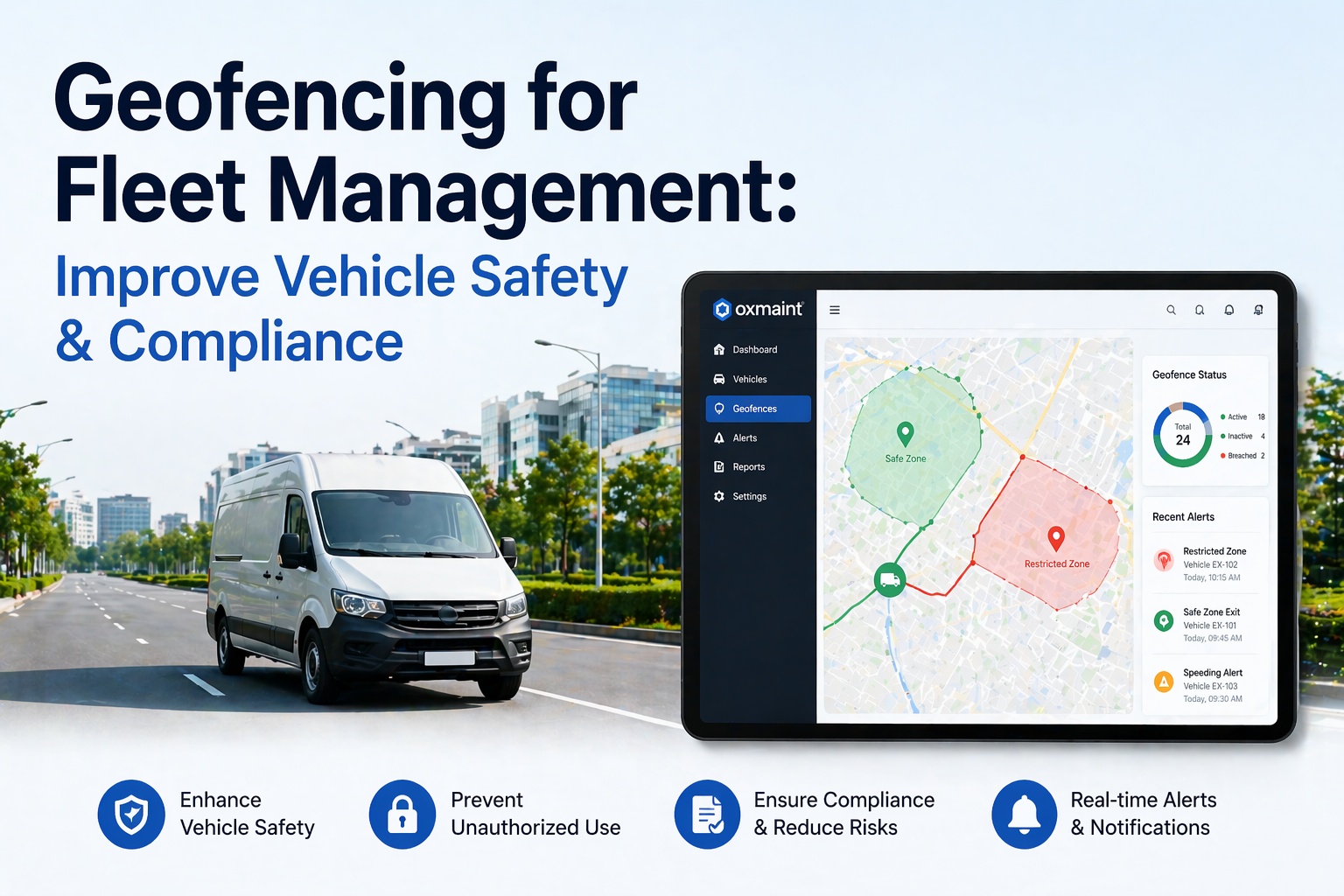
Fleet geofencing has evolved from a "know where the truck is" tool into a rule-based control layer for fleet safety, compliance, and automation. Instead of passively tracking GPS pins on a map, modern geofencing actively triggers real-time alerts and automated workflows the moment a vehicle crosses a virtual boundary — whether that's leaving the depot at 2 a.m., entering a low-clearance bridge zone, arriving at a customer site, or crossing into a restricted corridor. Fleets running geofencing as a safety and compliance layer report measurable outcomes: up to 74% reduction in unauthorized vehicle use within the first month of deployment, 60% reduction in inbound customer ETA inquiries, and 18% reduction in idle-time fuel costs. With crash-risk analyses showing distracted drivers are 240% more likely to crash and hard-braking events correlate with a 103% increase in expected loss costs, the case for location-based intervention is stronger than ever in 2026. This guide explains exactly how geofencing works for fleet management, the safety and compliance use cases that matter most, how to set up zones without alert fatigue, and the vendor-level considerations every fleet manager should weigh. Start your free HVI trial to activate geofencing across your fleet today, or book a 30-minute demo to see the full workflow live.
- What is geofencing in fleet management?
- The 3 geofence shapes and when to use each
- How geofencing improves fleet safety
- How geofencing improves regulatory compliance
- The 7 real-time alert types that matter most
- The 5-step geofence setup process
- Common challenges and how to avoid them
- Frequently asked questions
What is geofencing in fleet management?
Geofencing in fleet management is the use of GPS-defined virtual boundaries around real-world locations — depots, customer sites, restricted zones, route corridors — that automatically trigger alerts or automated workflows when a vehicle crosses the boundary. It combines three technologies: GPS tracking to locate vehicles in real time, telematics hardware to transmit location data continuously, and fleet management software to evaluate location events against configured business rules.
Onboard telematics hardware (dedicated unit, OEM module, or OBD-II dongle) transmits location coordinates every 10–60 seconds, accurate to within 5–10 meters on open road.
Fleet platform continuously evaluates each vehicle's coordinates against every configured geofence — detecting entry events, exit events, and dwell time inside each zone.
"If this, then that" logic fires the configured action: push notification, SMS alert, auto-generated work order, compliance log entry, customer ETA, or driver prompt.
The 3 geofence shapes and when to use each
Most modern fleet platforms support three geofence shape types. Choosing the right shape for each use case is the difference between a clean alert system and alert fatigue that teams eventually mute.
Fixed radius around a single GPS point. Fastest to create — one click and drag. Best for simple point-of-interest monitoring where exact boundary shape is not critical.
Multi-point boundary matching irregular area shapes. Most precise for real-world locations with complex perimeters, territory mapping, or restricted compliance zones.
Virtual boundary running along a planned transport route with configurable width. Flags deviations from the assigned path — essential for regulated routes or hazmat compliance.
How geofencing improves fleet safety
Safety is where geofencing delivers the most direct, measurable impact. Here are the four safety outcomes fleets consistently report after deployment.
After-hours depot geofences trigger instant alerts if a vehicle moves outside business hours. Fleets deploying after-hours geofencing report up to 74% reduction in unauthorized movement within the first month — drivers know the boundaries are monitored.
Geofences around job sites, yards, and distribution centers can enforce site-specific speed thresholds. Drivers exceeding the posted limit inside the zone trigger instant coaching alerts — reducing incident risk in high-traffic operational areas.
Low-clearance bridges, residential weight-restricted zones, school zones, and other "never enter" areas get polygon geofences. Vehicles approaching or entering trigger immediate driver warnings and fleet manager notifications.
After-hours and depot geofences detect vehicle theft in real time — not the next morning. For fleets with high-value vehicles, specialized equipment, or hazardous cargo, this is a basic security requirement rather than a nice-to-have.
How geofencing improves regulatory compliance
Compliance is the second major use case for fleet geofencing. Location-based triggers automate compliance workflows that would otherwise depend on driver self-reporting — which is the weakest link in any compliance program.
The 7 real-time alert types that matter most
Not every geofence event deserves an alert. Configuring the right alert mix is the difference between a system teams actually trust and one they ignore. Here are the seven alert categories most fleet safety programs prioritize.
Vehicle exits depot outside scheduled operating hours. Push + SMS to fleet manager and security lead within seconds of event.
Vehicle enters a defined "never enter" zone — low bridge, weight-restricted area, unapproved route. Driver gets in-cab warning; manager gets notification.
Vehicle leaves planned route by more than configured threshold. Critical for hazmat and high-value cargo — potential theft or unauthorized diversion.
Vehicle dwelling at a location beyond expected duration — indicates breakdown, unauthorized stop, or wasted idle fuel burn.
Auto-timestamps job start and end, triggers customer ETA SMS, and logs dwell time for invoicing. Dispatcher notified of completion.
Driver crosses into another driver's assigned territory. Logged for weekly review, not instant push — context matters.
Regulated zone entry (ULEZ, LEZ, commercial restriction) silently logged for audit — no alert needed, record only.
The 5-step geofence setup process
Setting up a geofence program is not complicated — but skipping steps creates the alert fatigue that kills deployments in month two. Here is the sequence that works.
Start with depots, top 10 customer sites, known restricted areas, and any hazmat or regulatory zones relevant to your routes. Avoid the temptation to geofence everything — 80% of value comes from 20% of zones.
Circles for simple points, polygons for irregular sites, corridors for route compliance. Match the shape to the real-world boundary — an overly large circle generates false exits, an overly tight polygon generates false entries.
Entry, exit, dwell time, speed inside zone. Each trigger gets a severity (critical/high/medium/info) that determines alert channel — push notification, SMS, email, silent log.
Safety leads get critical alerts; dispatchers get arrival/departure events; mechanics get maintenance zone triggers; drivers get in-cab warnings. Wrong routing is the #1 cause of alert fatigue.
Drivers should know exactly which zones are monitored, what events generate alerts, and why. Transparency converts geofencing from a surveillance perception into a documented safety program — essential for driver trust.
Work through the 5-step setup with our free checklist covering zone prioritization, shape selection, trigger configuration, alert routing, and driver communication templates. Available inside every HVI account.
Get the free checklistCommon geofencing challenges and how to avoid them
Geofencing failures are almost always implementation failures, not technology failures. Here are the four challenges every deployment runs into — and the practical fix for each.
Frequently asked questions — fleet geofencing
Turn every location event into a fleet management action.
HVI's geofencing connects directly to your inspection, maintenance, and compliance workflows — not as a standalone tracking feature but as an operational control layer. Depot exit triggers pre-trip prompts; shop arrival opens PM work orders; restricted zone entry fires instant alerts; every event becomes an auditable record. Stop running location tracking and compliance as two separate systems.
No credit card required · Zones live in minutes · Integrated with DVIR, PM, and compliance